What hreflang means
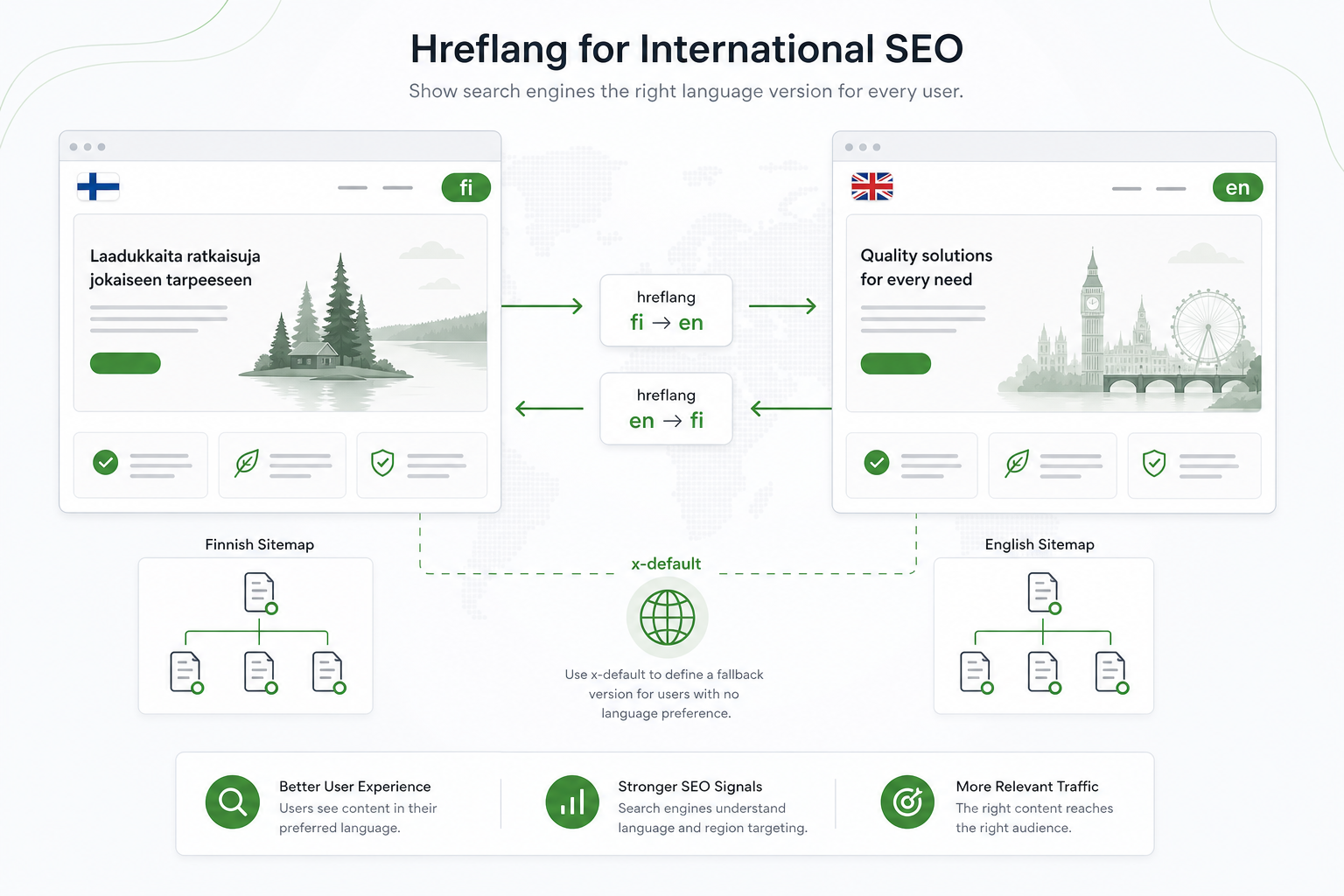
Hreflang is an HTML attribute (or HTTP header / sitemap entry) that tells search engines a page’s language and target region. Example: hreflang="fi-FI" for the Finnish version, hreflang="en" for English.
Hreflang does not translate the page for users — it guides the search engine to show the right version to the right audience. Without hreflang, Google may index the wrong language or show English to a Finnish searcher.
On a multilingual site, each language version has its own URL (e.g. /blogi/... vs. /en/blog/...). Hreflang connects these versions and signals which is the equivalent of which.
Hreflang is part of broader technical SEO together with canonicals, sitemaps, and URL structure.
Why hreflang is critical
Why hreflang is mandatory on multilingual sites
When the same content exists in multiple languages, Google treats them as alternate versions, not duplicates — if hreflang is correct. Without it, they may appear as duplicate content and weaken rankings.
Hreflang improves UX: Finnish searchers find Finnish, international users find English. That lifts CTR and reduces bounce rate.
In ecommerce, hreflang is especially important: product pages, categories, and checkout language must target correctly. Read our ecommerce SEO guide for multilingual stores.
- Prevents language version cannibalization
- Improves visibility of the right version in the right country
- Supports international ecommerce
- Works together with canonicals
Hreflang tags in practice
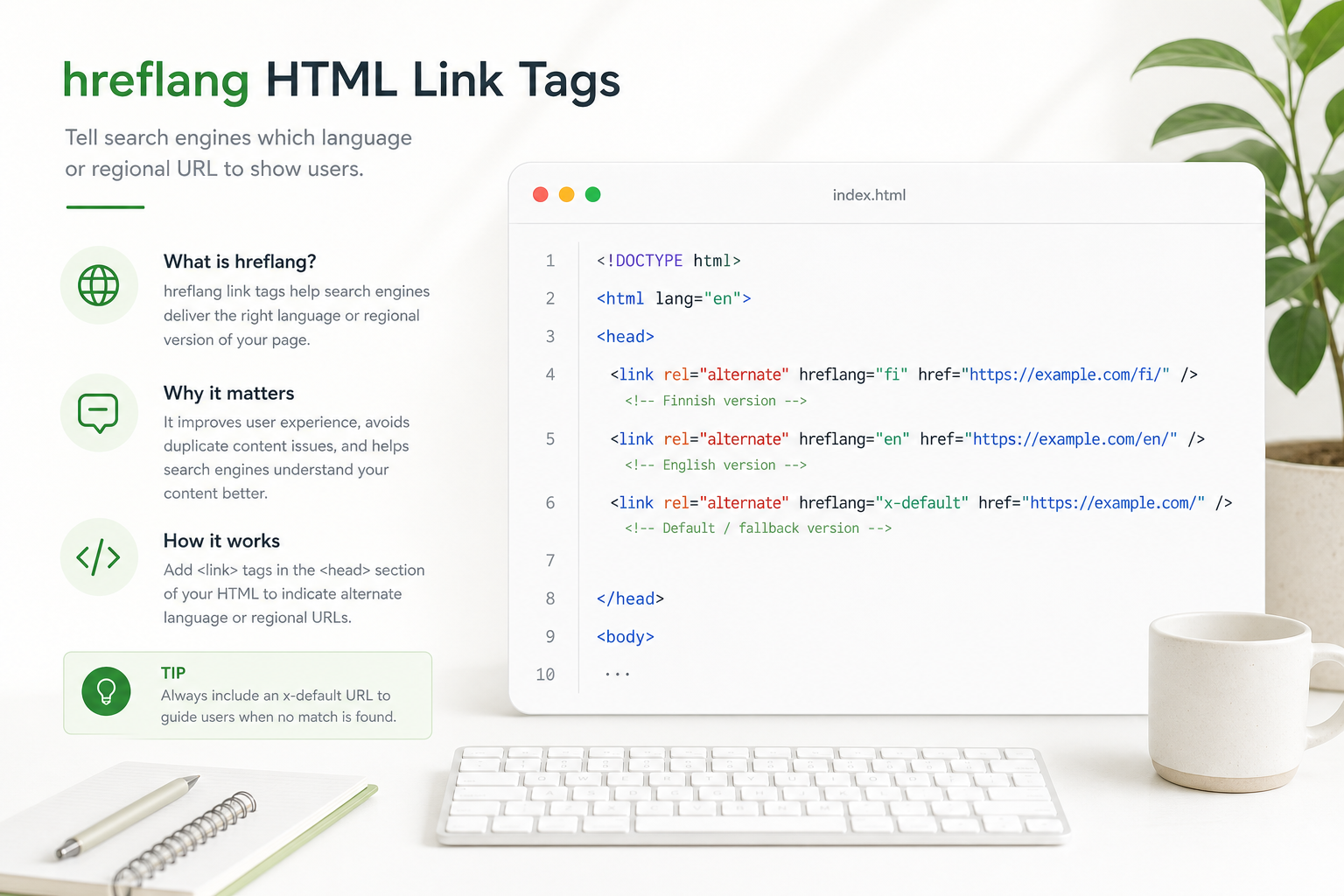
Hreflang can be implemented three ways: HTML link elements in the page head, an HTTP header, or an XML sitemap. Most sites use HTML links or sitemap — or both.
Each page lists all language versions, including itself. On the FI page: links to Finnish, English, and x-default. On the EN page: the same list — reciprocal references.
Language codes follow ISO 639-1 (fi, en) and country codes ISO 3166-1 (FI, US). Plain fi is enough if you do not need regional splits. Avoid mixing language and region codes inconsistently.
x-default — default version for international users
x-default defines the version shown when no language/country combination matches the user’s settings. Typically the English version or a language picker page.
x-default does not replace other hreflang values — it is an additional signal. If your site has only FI and EN, x-default can point to English for international visitors.
Do not set x-default to a random page. It should be a sensible default: usually English or a language selector.
FI/EN site URL structure
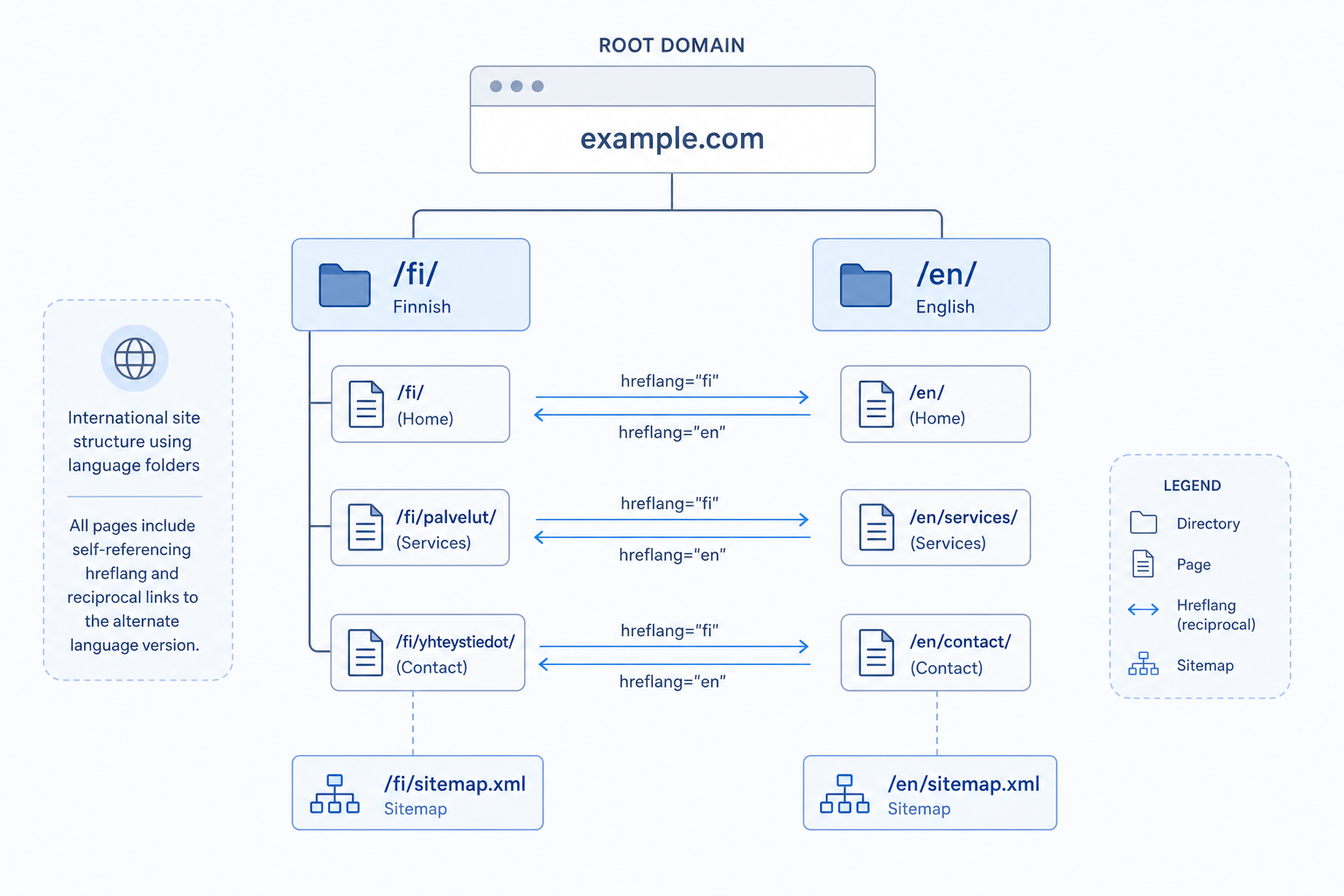
A structure like AlgoTerra’s: Finnish pages at the root (/blogi/..., /palvelut/...), English under /en/ (/en/blog/..., /en/services/...).
Every Finnish page has an English equivalent — and vice versa. A missing equivalent is an hreflang error: do not reference a page that does not exist.
Language switcher links in navigation help users; hreflang helps search engines. You need both.
Sitemap tip
Sitemap and hreflang integration
In an XML sitemap, hreflang is marked with xhtml:link alternate elements under each URL (rel alternate, hreflang and href attributes). Google reads these the same way as HTML tags.
Sitemap hreflang is convenient when you have many pages: one file, automatic generation at build time. Ensure every URL lists all alternates.
Submit the sitemap in Search Console and monitor international targeting reports. Errors appear under Indexing.
Most common hreflang errors
Missing return link: FI references EN, but EN does not link back — Google ignores the signal.
Wrong language code: e.g. fin instead of fi, or inconsistent mixing of language and region.
Reference to a 404 or redirect chain: the hreflang URL must return 200 and be a direct equivalent.
Canonical conflict: canonical points somewhere other than hreflang suggests — fix canonical first. Read on-page SEO 2026 for canonical basics.
- Missing reciprocal hreflang
- Incorrect ISO language codes
- 404 or redirect on hreflang URLs
- Canonical and hreflang in conflict
Ecommerce and international SEO
In multilingual stores, hreflang applies to product pages, categories, and checkout. Every product needs an equivalent in each market — or a clear reason why not.
Price, currency, and availability may differ by country; hreflang does not replace Product schema and localized content. Combine hreflang, schema, and local landing pages.
Language in query parameters is a poor pattern — use path-based structure (/fi/tuote vs. /en/product).
Audit and fixes
Audit hreflang with Screaming Frog, Sitebulb, or Search Console international reports. Find missing return links, wrong language codes, and orphan pages.
Fix systematically at template level (Layout.astro, head component) so hreflang is generated automatically for every page — do not add it manually to hundreds of articles.
After launch, test with URL Inspection: do the correct hreflang references appear?
Hreflang in numbers
Summary and next steps
Hreflang is the technical foundation of a multilingual site: it tells Google the right version for the right audience and stops language versions from competing. Implement it at template level, keep reciprocal links intact, and audit regularly.
Next, ensure canonicals, sitemap, and internal linking support the same structure. Deeper technical background: technical SEO guide. Need help? Our SEO service.
Hreflang checklist
Run this list before launching a new language version and during audits.
- Every page lists all language versions
- Reciprocal hreflang in all versions
- x-default set sensibly
- Correct ISO language and country codes
- No references to 404 or redirect pages
- Canonical and hreflang aligned
- Sitemap includes hreflang entries
- Template generates tags automatically
Frequently asked questions
What does hreflang do?
Hreflang tells search engines a page’s language and target country so the right version is shown to the right audience. It prevents language version cannibalization and improves international visibility.
What is x-default?
x-default is an hreflang value that defines the default version for users whose language/country does not match any other version. Typically English or a language picker page.
Does every page need hreflang tags?
Yes — every indexable page with language versions needs reciprocal hreflang to all versions. Missing tags weaken the entire signal.
HTML or sitemap hreflang?
Both work. HTML head suits small sites; sitemap scales better for large ones. Do not use conflicting markup in both.
How does hreflang relate to canonical?
Canonical and hreflang must not conflict. Canonical points to the preferred URL of the same language version; hreflang lists all language versions. Fix canonical before hreflang auditing.