What schema markup (structured data) is
Schema markup is standardized code added to a page’s source to tell search engines the meaning of the content. It is based on the Schema.org vocabulary, maintained jointly by Google, Microsoft, Yandex, and other search engines.
A human easily understands that "$29" is a price and "★★★★☆" is a rating, but to a search engine the text is just a string. Structured data removes this ambiguity: it unambiguously marks this as a price, this as a rating, and this as an event date.
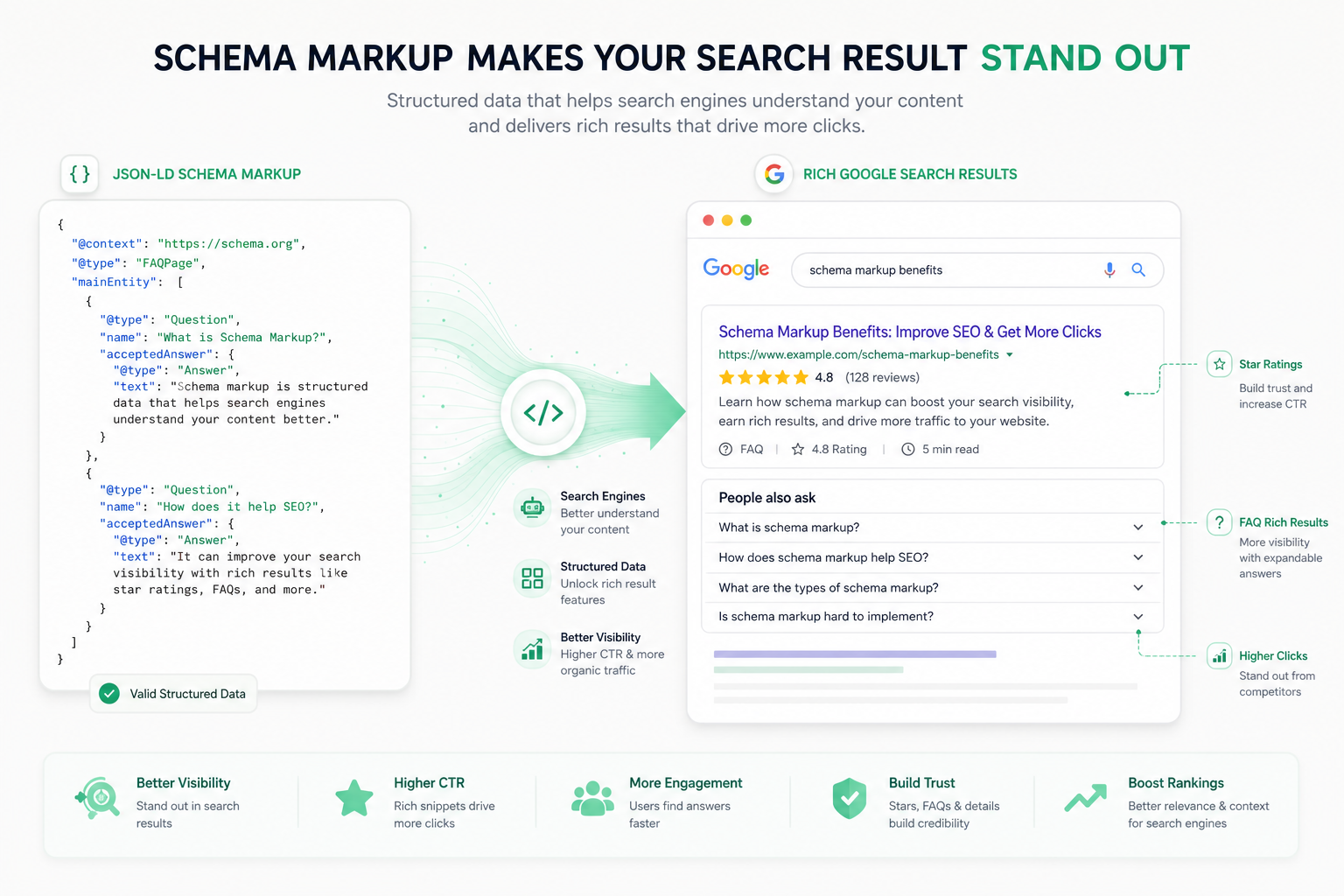
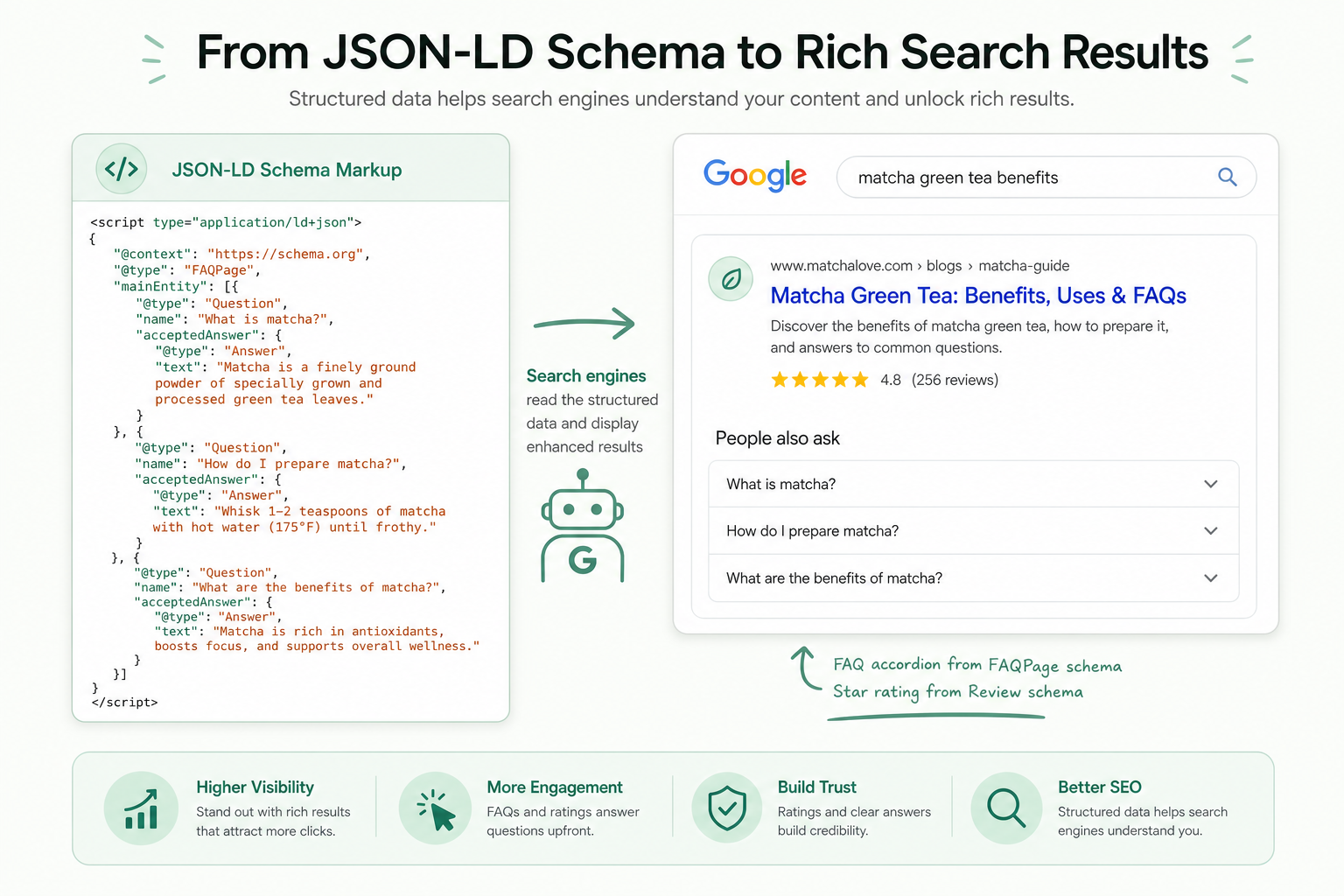
When a search engine understands the structure of content, it can show rich results: star ratings, FAQ dropdowns, recipe cook times, or product prices directly in search. These stand out and lift click-through rate.
In 2026 structured data also serves AI search engines and Google’s AI overviews: clearly marked content is easier to extract and cite in answers. In this guide we walk through the four most important schema types with examples.
Why schema markup is worth it
Structured data is not a direct ranking factor, but its indirect impact is significant. Rich results take up more space in search, stand out visually, and lift click-through rate — and a better CTR correlates with better rankings.
Schema also helps search engines understand entities: who your company is, what services you offer, and how your pages relate to each other. This strengthens the site’s topical authority.
For local businesses and online stores especially, schema is almost mandatory: LocalBusiness, Product, and Review schemas bring visibility that competitors without them simply do not get.
- Rich results stand out and lift CTR
- Helps search engines understand entities and context
- Supports AI search extraction and citation
- Almost mandatory for local businesses and online stores
Important note
JSON-LD is the recommended format
Structured data can be marked in three ways: JSON-LD, Microdata, and RDFa. Google clearly recommends JSON-LD, and the same recommendation holds in 2026.
JSON-LD’s advantage is that it is a separate block in the page’s head or body section and does not get tangled in the HTML structure. Microdata and RDFa are added directly to HTML elements, which makes them more fragile and harder to maintain.
JSON-LD is also easy to generate dynamically on the server or in a CMS and add to every page type programmatically. This makes it a scalable solution even for large sites.
- JSON-LD: a separate script block — Google’s recommendation
- Microdata/RDFa: in HTML elements — more fragile to maintain
- JSON-LD is easy to generate dynamically
- Place it in the head section or at the end of the body
Article schema — for blogs and articles
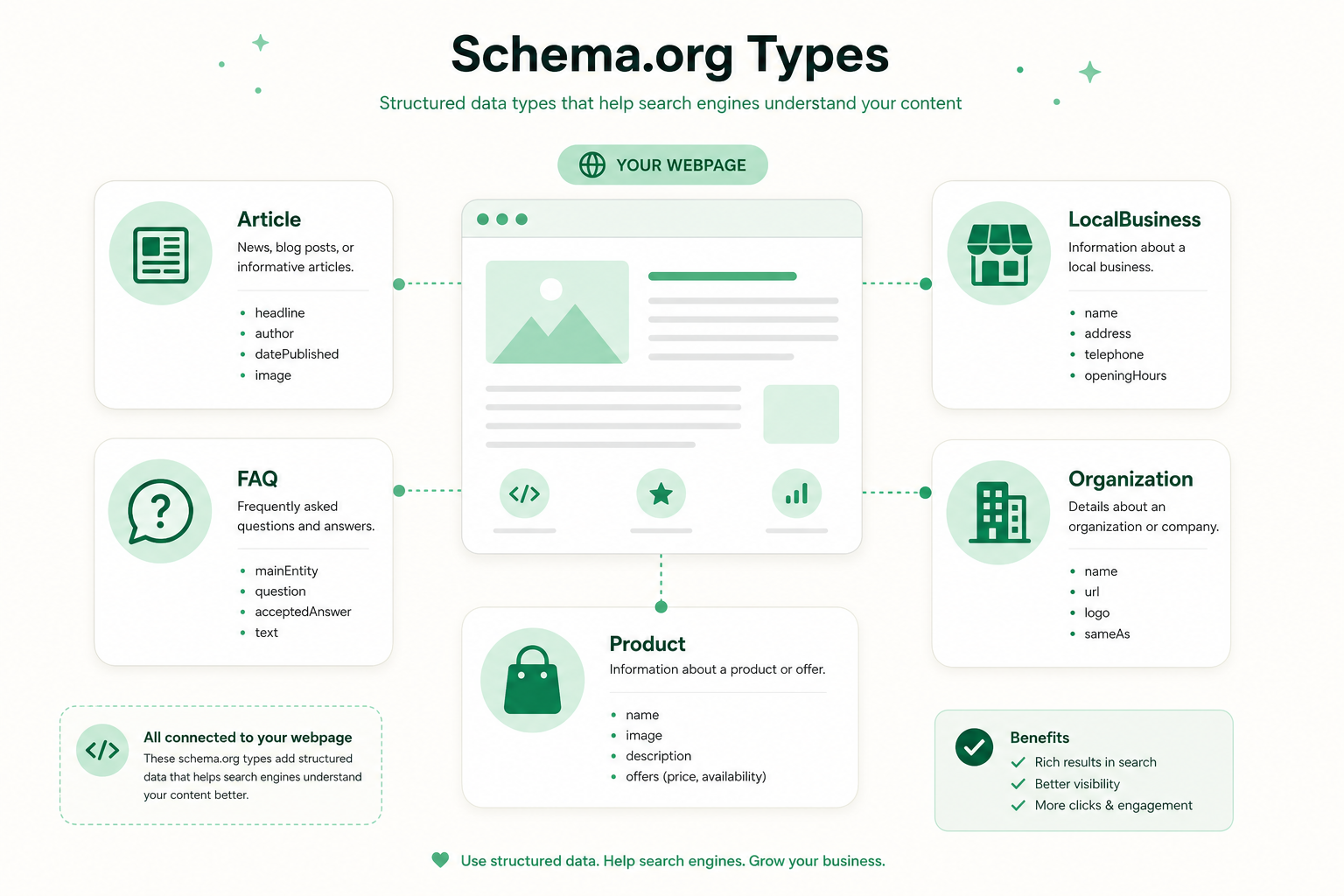
Article schema tells search engines that a page is an article and conveys the key metadata: title, author, publish date, modified date, and main image. It is a foundational tool for every blog and news site.
Article schema strengthens E-E-A-T signals: clear author attribution and publish dates indicate content freshness and who is responsible. This is especially important for AI search engine trust.
Use a more specific subtype when it fits: BlogPosting for blog posts and NewsArticle for news. Always include headline, author, datePublished, dateModified, and image.
- Conveys: title, author, publish and modified dates, image
- Strengthens E-E-A-T signals (author, freshness)
- Subtypes: BlogPosting, NewsArticle
- Required fields: headline, author, datePublished, image
FAQ schema — frequently asked questions
FAQPage schema marks a page’s frequently asked questions and answers. It can bring expandable question dropdowns directly into search, taking up more space and answering user questions before the click.
FAQ schema works great on service pages, product pages, and guides. The key is that the questions and answers must actually be visible on the page — hidden FAQ content must not be marked.
Each question is marked as a Question type and its answer in the acceptedAnswer field as an Answer type. The answer may contain HTML formatting such as links and lists.
- Brings expandable question dropdowns to search
- Suits service pages, product pages, and guides
- Questions must also be visible on the page
- Structure: Question → acceptedAnswer → Answer
LocalBusiness schema — for local businesses
LocalBusiness schema conveys a local business’s details: name, address, phone number, opening hours, location coordinates, and price range. It is the cornerstone of local SEO.
The schema supports the Google Business Profile and reinforces NAP consistency (name, address, phone). The more consistent the details are across the site and directories, the more trustworthy Google considers the business.
Use a more specific subtype by industry: Restaurant, Dentist, Plumber, or another suitable type. Include openingHoursSpecification and geo coordinates. Read more in our local SEO guide.
- Fields: name, address, phone, opening hours, coordinates
- Supports Google Business Profile and NAP consistency
- Subtypes by industry: Restaurant, Dentist, etc.
- Add openingHoursSpecification and geo data
Organization schema — for the brand
Organization schema tells search engines your company’s basics: official name, logo, website, social media profiles, and contact details. It is usually placed on the home page or every page.
Organization schema builds the brand entity in Google’s Knowledge Graph and can help a knowledge panel form in search results.
The sameAs field links official social media and other profiles, which strengthens entity recognition. The logo field enables the logo to appear in search results.
- Fields: name, logo, URL, social media, contact details
- Builds the brand entity in the Knowledge Graph
- sameAs links official profiles
- Logo can appear in search results
Validation and testing
Always add schema only after validation. Google’s Rich Results Test tells you which rich results the page is eligible for and shows errors and warnings.
The Schema.org Validator (formerly the Structured Data Testing Tool) checks general syntax independently of Google. Use both: one tells you about rich-result eligibility, the other about syntax correctness.
After publishing, monitor the "Enhancements" section of Google Search Console, which reports structured data errors across the whole site. Fix errors and warnings to keep eligibility.
- Rich Results Test: eligibility for rich results
- Schema.org Validator: general syntax check
- Search Console: site-wide errors and warnings
- Always validate before publishing and monitor after
Schema markup impact in numbers
Common mistakes in schema markup
The most common mistake is marking content that is not visible on the page. Google requires that marked content be visible to the user — a hidden FAQ or a fabricated review can lead to a manual action.
A second mistake is missing required fields. Every schema type has required properties; without them the page is not eligible for rich results. The Rich Results Test shows them.
A third is leaving outdated or duplicate schema in place. Do not mark the same thing multiple times in different formats, and update schemas when content changes.
- Do not mark content that is not visible on the page
- Fill all required fields per schema type
- Avoid duplicate and outdated schemas
- Do not mark fabricated reviews or data
Schema markup checklist
Run this list when you add or update structured data. It covers the format, the key types, and validation.
Once schema is in order, continue to technical SEO and on-page optimization. Need help? Explore our SEO service.
- Use JSON-LD format in a separate script block
- Article schema for blogs and articles
- FAQPage schema for visible questions
- LocalBusiness schema for locations (NAP + hours)
- Organization schema for the brand (logo, sameAs)
- Validate with Rich Results Test and Schema.org Validator
- Monitor the Enhancements section in Search Console
Frequently asked questions
What does schema markup mean?
Schema markup, or structured data, is code that tells search engines what page content means. It is based on the Schema.org vocabulary and can earn rich results such as star ratings or FAQ dropdowns.
What is the best schema format?
Google recommends the JSON-LD format. It is a separate script block that does not tangle with the HTML structure, is easy to generate dynamically, and simple to maintain. Microdata and RDFa are alternatives, but more fragile.
Does schema markup improve rankings?
Schema is not a direct ranking factor, but its indirect impact is significant: rich results stand out and lift click-through rate, which correlates with better rankings. It also helps AI search engines understand content.
Which schema types are most important?
Four cover most needs: Article for blogs, FAQPage for questions, LocalBusiness for local businesses, and Organization for the brand. Online stores add Product and Review schemas.
How do I test schema markup?
Use Google’s Rich Results Test to see which rich results the page is eligible for, and the Schema.org Validator to check syntax. After publishing, monitor the Enhancements section in Search Console.