
Why Catalog Ads is the core format for ecommerce
Meta Catalog Ads shows your products automatically based on the product feed. Instead of building each ad by hand, the catalog does it for you.
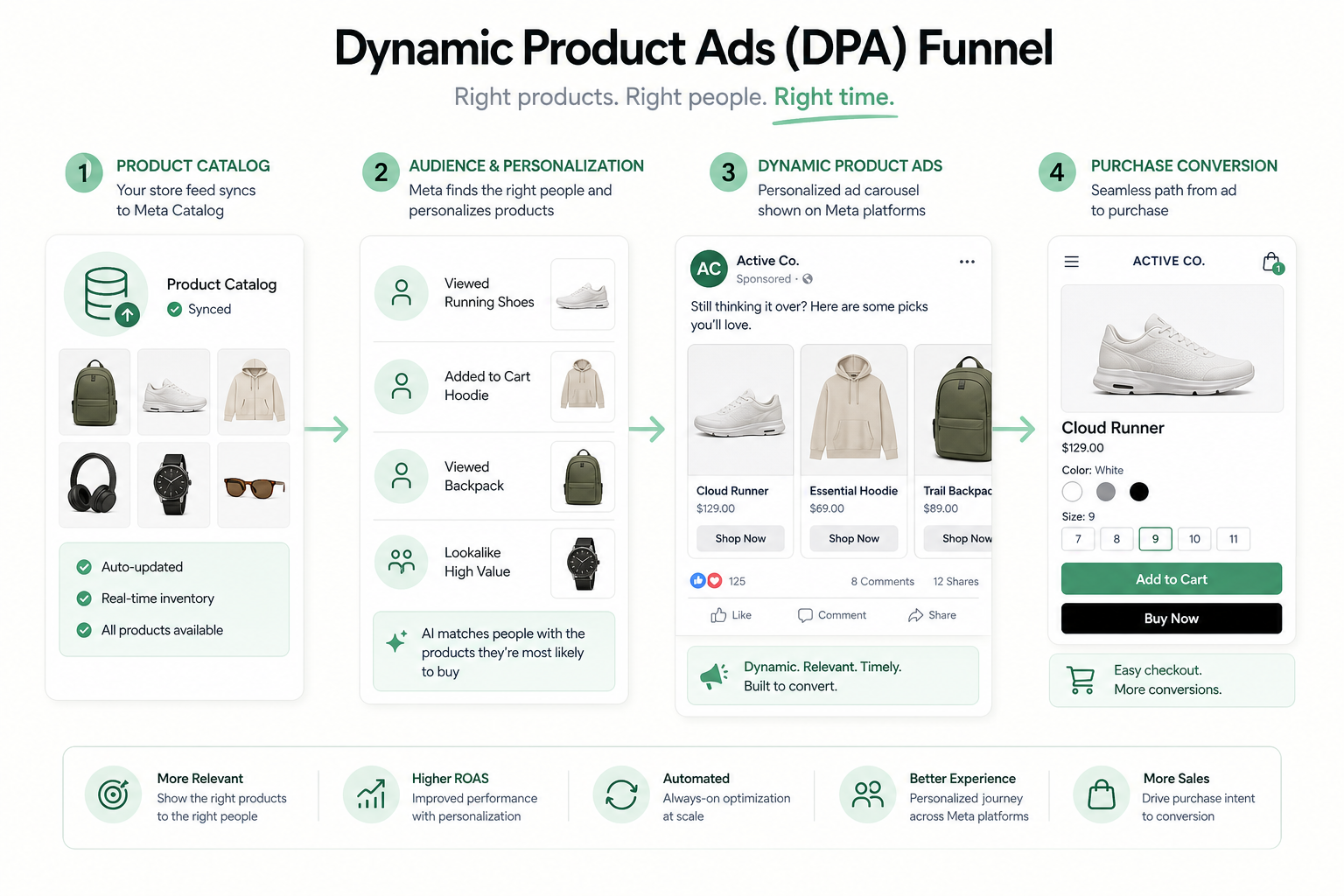
Dynamic product ads (DPA) combine the catalog and user data: the algorithm shows exactly the products a user is likely interested in.
This is decisive for an ecommerce store with dozens or thousands of products. Manual advertising does not scale — the catalog scales automatically.
This guide covers the whole chain: product feed, catalog structure, dynamic remarketing, and broad prospecting. We start with the feed, which is the foundation of everything.
Automation scales
Product feed — the foundation of everything
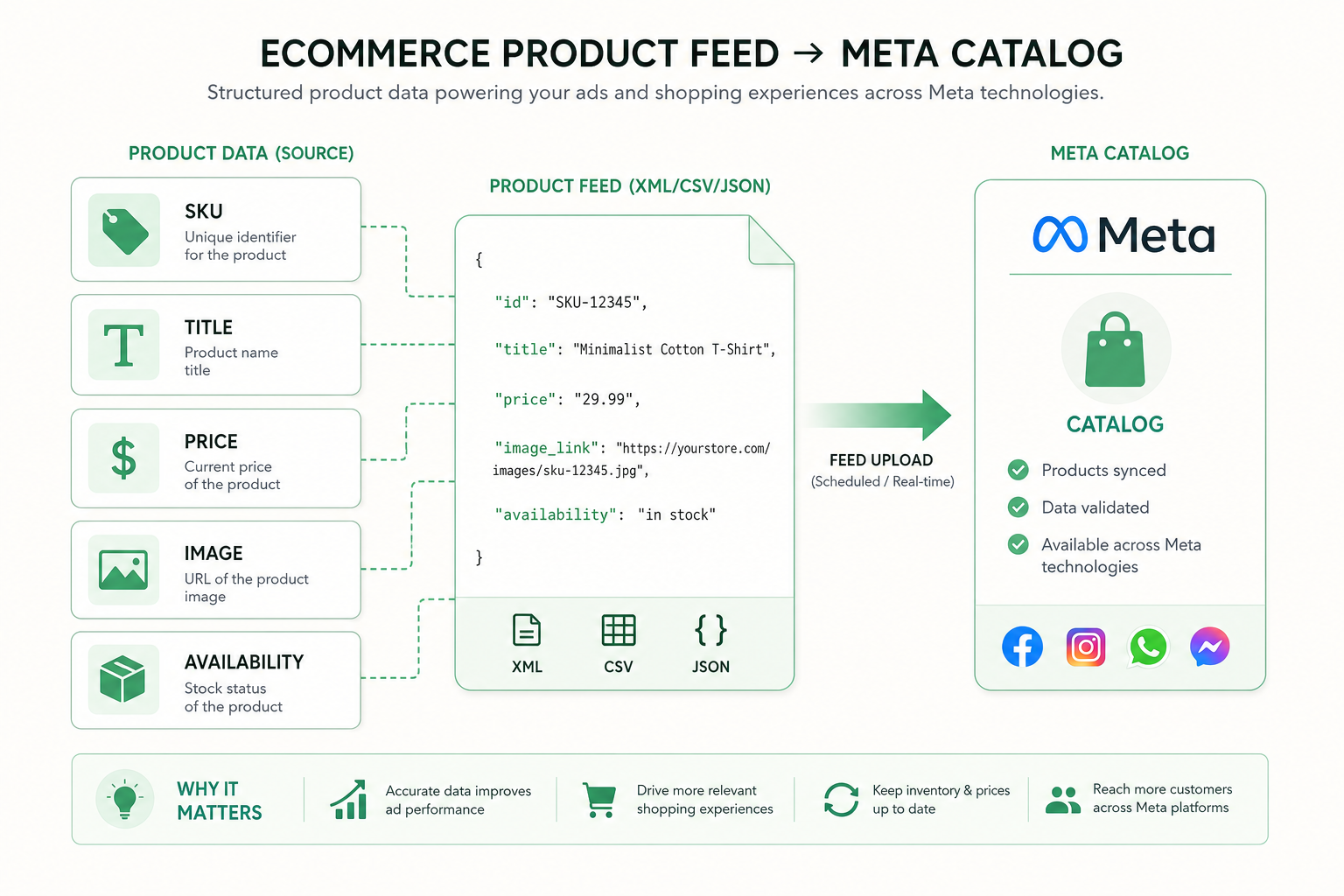
The product feed is a file containing all your products: names, prices, images, availability, and descriptions. It is the foundation of Catalog Ads — quality decides everything.
Keep the feed current and error-free: wrong prices or sold-out products ruin the user experience and waste budget. Automatic sync from your store is recommended.
Optimize product names and descriptions to be search-friendly and use high-quality images. A good feed improves both relevance and conversion.
- Includes names, prices, images, availability, descriptions
- Keep current — automatic sync
- Error-free prices and availability
- Optimized names, descriptions, and quality images
Catalog structure — product sets
The catalog imports the product feed into Meta system. Inside it you can create product sets that group products by, for example, category, price, or best sellers.
Product sets enable targeted advertising: you can promote different product groups to different audiences or emphasize your highest-margin products.
Keep the catalog consistent and correctly categorized. A clear structure helps the algorithm show relevant products and makes campaign management easier.
- Catalog = product feed in Meta system
- Product sets group products (category, price, best sellers)
- Different sets for different audiences or emphasis
- Clear categorization improves relevance
Dynamic product ads (DPA) — automatic targeting
Dynamic product ads (DPA) combine the catalog and user behavior. The algorithm picks the most relevant products for each user automatically.
DPA works both in remarketing (show the products just viewed) and in prospecting (show likely-interesting products to new people).
This pairs well with Advantage+ campaigns, where automation handles targeting and optimization broadly.
- Combines the catalog and user behavior
- Works in both remarketing and prospecting
- Algorithm picks the most relevant products per user
- Pairs with Advantage+ automation
Dynamic remarketing — bring browsers back
Dynamic remarketing shows users exactly the products they viewed or added to cart. This is the single most effective ad format for ecommerce.
Because the message is extremely relevant (the exact product considered), conversion is efficient. Add a reminder, social proof, or a small incentive to complete the purchase.
It requires a working pixel and ideally the Conversions API (CAPI) so product events (ViewContent, AddToCart, Purchase) are passed reliably.
- Shows exactly the viewed / carted products
- Extremely relevant = efficient conversion
- Reminder + proof + small incentive
- Requires a working pixel and CAPI
Broad DPA prospecting — new customers automatically
Broad DPA prospecting shows catalog products to new people without a prior site visit. The algorithm predicts which products each person is likely interested in.
This extends catalog advertising from remarketing to growth: you reach new customers with relevant products. Pair it with a broad audience and let the algorithm learn.
Scale gradually and track total profitability. Deeper scaling is in our Meta ads scaling guide; the ecommerce channel mix in our ecommerce Google Ads article.
- Shows products to new people (no prior visit)
- Algorithm predicts interesting products
- Extends catalog advertising to growth
- Scale gradually, track total profitability
Feed optimization — continuous fine-tuning
Product feed optimization is ongoing work that directly improves ad performance. Start with product names: a clear, search-friendly name improves relevance.
Add as many fields to the feed as possible: category, brand, color, size, and condition. The richer the data, the better the algorithm targets.
Use high-quality, consistent product images. The first image often decides the click — test different angles and backgrounds.
Prioritize your best products by margin and availability in product sets. Do not waste budget on products that are running out or low-margin.
Sync the feed automatically from your store at least once a day, ideally in real time. This keeps prices and availability current without manual work.
Fix feed errors and gaps regularly. Meta diagnostics tells you which products were rejected and why.
- Clear, search-friendly product names
- As many fields as possible (category, brand, color, size)
- High-quality, consistent product images
- Prioritize your highest-margin products
- Fix rejected products using diagnostics
Catalog Ads in numbers
Metrics and tracking
Catalog Ads results are measured by ROAS, but also by catalog coverage: how large a share of products get impressions and sales.
Track dynamic remarketing and broad prospecting results separately. Remarketing produces a high ROAS, prospecting brings new customers.
Watch feed health: the number of rejected products, missing fields, and errors. A healthy feed is a prerequisite for good performance.
Also measure product-level performance: which products sell best in ads, and weight them in your product sets.
Set a clear target ROAS by product group. Different categories have different margins, so one shared target can hide unprofitable groups.
Connect Catalog Ads metrics to the full ecommerce picture following our ecommerce Google Ads guide.
- ROAS and catalog coverage
- Remarketing and prospecting separately
- Feed health: rejected products and errors
- Product-level performance in product sets
Common Catalog Ads mistakes
We see these mistakes often when the catalog or feed is built carelessly.
- Outdated feed: wrong prices or sold-out products
- Low-quality or missing product images
- Pixel or CAPI does not pass product events correctly
- Only remarketing, no broad DPA prospecting
- No product sets — no targeted advertising
- Catalog not synced automatically from the store
Feed quality decides everything
Catalog Ads checklist
Run through this list when building or improving ecommerce Catalog Ads. It covers the feed, the catalog, and DPA.
Connect Catalog Ads with Advantage+ automation and the channel mix: read Meta Advantage+ 2026 and ecommerce Google Ads. Explore our Meta advertising service.
- Current, error-free product feed (auto-sync)
- Quality images and optimized product data
- Catalog and product sets built
- Pixel + CAPI pass product events
- Dynamic remarketing live
- Broad DPA prospecting for growth
Frequently asked questions
What does Meta Catalog Ads mean?
Meta Catalog Ads shows ecommerce products automatically based on the product feed. Instead of building each ad by hand, the catalog turns your feed into dynamic product ads.
What are dynamic product ads (DPA)?
DPA (Dynamic Product Ads) combine the catalog and user behavior: the algorithm shows each user the most relevant products automatically. DPA works in both remarketing and prospecting.
Why is the product feed so important?
The product feed is the foundation of all Catalog Ads. If the feed is outdated or wrong (incorrect prices, sold-out products), the ads show wrong information and budget is wasted. Keep the feed current with automatic sync.
Does DPA also work for new customer acquisition?
Yes. Broad DPA prospecting shows catalog products to new people without a prior site visit. The algorithm predicts which products each person is likely interested in, so the catalog supports growth too.
Does Catalog Ads need a pixel and CAPI?
Yes. Dynamic remarketing requires a working pixel and ideally the Conversions API (CAPI) so product events (ViewContent, AddToCart, Purchase) are passed reliably to the algorithm.